Work it out
Work it out is the dashboard page where you design a piece of work with codeably before any ticket exists, or talk through a ticket that already does. You describe what you want to be true, hand over whatever material you have (screenshots, a folder of the old site, a link), the design partner reads the project's code and answers, and when the two of you agree it proposes something to file: a bug ticket, a spec, a cut of several specs for one ticket, or a list of tickets that wait for each other. You approve it and it files. A ticket that has already run is a different conversation: there the ticket steward leads, and it changes the ticket's series and starts its next attempt on your word. The rules of the conversation itself, the same in Slack, Teams and here, are on Spec dialogue. This page covers what the dashboard shows you.
Finding the page
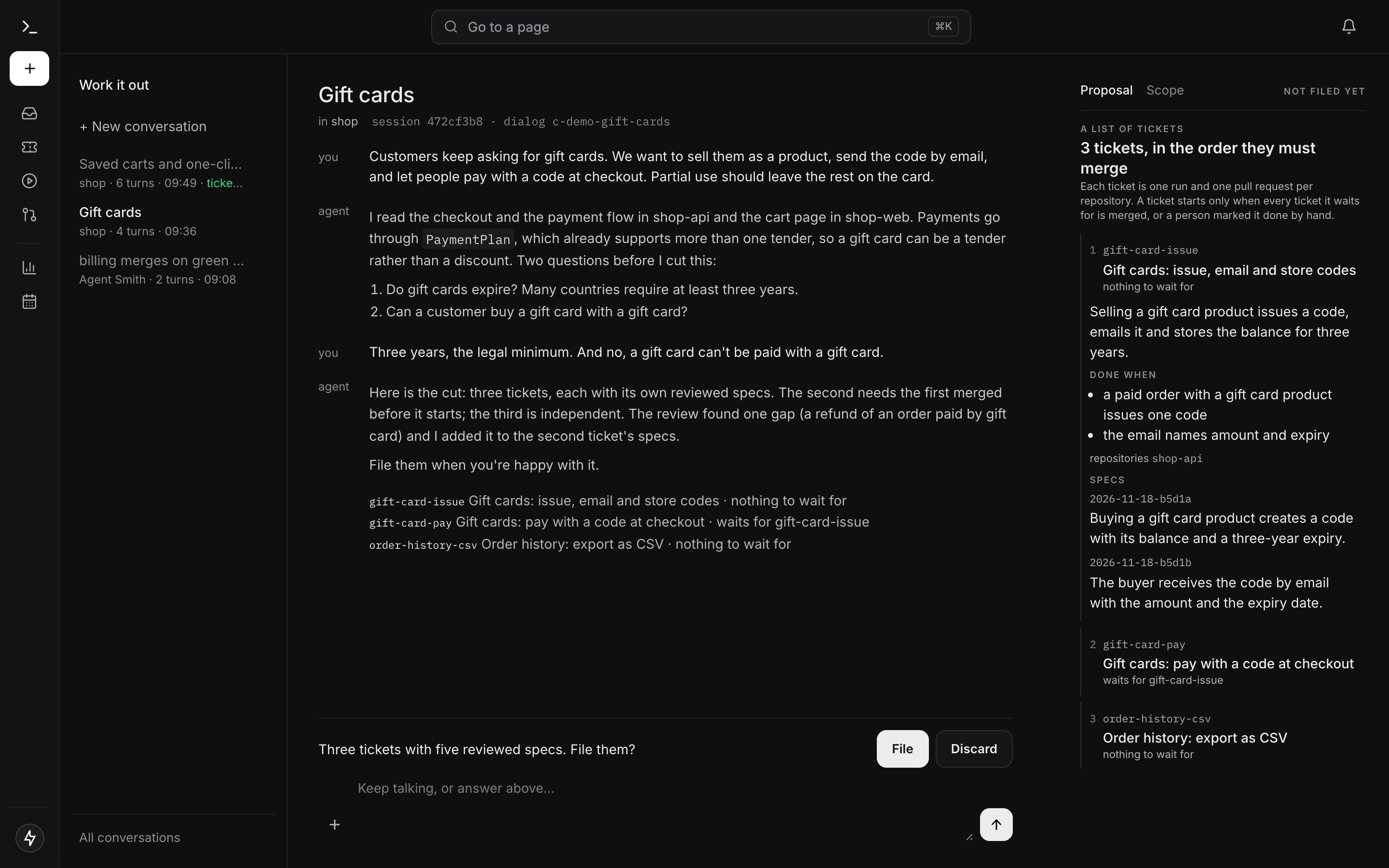
Every conversation starts from the home page's question, What should we work on?, or from New work in the sidebar: your first message, with the project picked beside the +, opens the conversation at /spec-dialog. The page then has three parts: a plain bar on the left listing your conversations (with + New conversation and All conversations), the exchange in a single column in the middle with the composer under it, and a pane on the right that shows what the conversation reads, proposes, filed and holds. The app sidebar shrinks to icons on this page. On a narrow screen the parts stack.
The page needs the dialog.write permission. A caller without it is told which permission is missing instead of being shown an empty page. See Access control.
The page also takes a few query parameters, so other pages and your own bookmarks can link straight into a conversation:
| Parameter | What it does |
|---|---|
?open=<session> |
Opens that conversation. The conversations list writes these links. |
?ticket=<id> |
Opens the conversation that ticket already has, or gets ready to start one about it. |
?project=<name> |
Names the project the ticket belongs to. Without it the ticket's own labels decide. |
Each parameter is used once and then removed from the address, so reloading the page doesn't reopen something you've since moved away from.
Starting a conversation
+ New conversation shows the same question and composer as the home page: the project picker beside the +, files held until you send, and no pane yet. A conversation reads one project's repositories, so it needs a project; with exactly one configured, it is picked for you.
Beneath the composer sits a search field, "Find a ticket by name or number". Type at least three characters and every configured tracker is searched. Each hit shows its key, its title, the tracker it came from and the tracker's own word for its kind (Bug, Task, User Story, whatever the board calls it; GitHub has no kinds, so it shows none). A hit whose number is exactly what you typed is marked "this number". A ticket that already has a conversation is marked "has a conversation", and picking it takes you to that one rather than starting a second. If a tracker couldn't be searched, or more tickets matched than are shown, the field says so.
Picking a ticket also picks the project, from the ticket's own labels on the tracker that holds it. If the labels name several projects, or none, the page tells you why and lets you choose. A ticket on a tracker that has no configured project can't be bound here, and the page says that instead of offering a project on another board. Picking a project by hand with no ticket in play clears the ticket search.
An empty conversation greets you, by name when your sign-in carries a readable one. The conversation actually opens when you send your first message, or when you attach something.
The composer
Type in the box at the bottom and press Enter to send (Shift+Enter for a new line). The + button, labelled "Attach", opens a menu with three entries:
- Image takes one PNG, JPEG, GIF or WebP file. The kind is read from the bytes, so a renamed file doesn't pass. Use it for a screenshot of the broken screen or a sketch of what you want. The image shows up in the exchange, and every turn is shown the four most recent images the conversation holds, as pictures, when the project's model has vision (
supports_vision). - Files takes several files at once, or a single
.zip, which the server unpacks. - Folder takes a whole directory, each file under its path. Your browser may ask you to confirm a folder upload; that prompt is the browser's, the page can't change it.
What Files and Folder send becomes an upload set, described in the next section. You can attach before you've written anything; the conversation opens to keep it.
Uploads
An upload set is material for the conversation: the old version of a site you want rebuilt, a prototype, a folder of example documents, an export from another tool. codeably keeps every file you authored, whatever its type. What it leaves out is named with the reason: operating-system litter (.DS_Store, Thumbs.db, desktop.ini), folders that a build recreates (.git, node_modules, .venv, __pycache__, .next, .terraform and the like, each named once as the folder), and a file larger than the per-file limit. Files that commonly hold credentials (.env, .npmrc, *.pem, *.key, id_rsa, credentials*.json, a kubeconfig) are kept, because you chose to send them and they say what the material needs, but the composer names them so you know the model and the run will read them.
Before a Files or Folder pick is sent, the page shows it: the top-level entries with their sizes and a running total ("Sending 112 files, 3.4 MB"). Entries the folder's .gitignore ignores and rebuildable folders start unticked. You send what you tick.
The limits are stated, and a refusal names the one that was crossed instead of cutting anything:
| Limit | Value |
|---|---|
| Files in one set | 500 |
| One set, and one file in it | 25 MB |
| Everything one conversation holds, sets and images together | 100 MB |
A copy is refused too. An image with the same bytes as one the conversation holds is refused with when it was attached. A set whose every file is already in the conversation is refused with the set that holds them. A single file you already sent is held back with where it is and a Send anyway. A pick with even one new file is stored whole, because a second version of a folder must stay complete.
The Uploads tab
The pane's Uploads tab lists everything you handed this conversation, oldest first, with the usage on top ("38 MB of 100 MB used, 62 MB left"). A set opens to its file tree. Each file opens a preview (text up to its first 200 KB, pictures as pictures) with a Download, and each file can be removed on its own. Remove on the row removes the whole set or image after a confirmation. A transcript chip for an upload brings you to its row.
An upload an approval cites can't be removed, because the run of the filed ticket builds against it. The row says "cited by an approval" instead of offering a button. After an approval, an upload that came later says so: a run carries it only once the ticket is approved again. When the project's model doesn't see images at all, or doesn't see the images inside sets, the tab says that too, so you don't wait for an answer about a screenshot the model never got.
What the design partner does with an upload
Each set is a read-only address in the turn's sandbox map, reference:<name>, named after the upload. The design partner reads it with the same file tools it uses on the repositories: read_file, grep, listing. On top of that it has:
run_commandwithrepo: reference:<name>, a shell command in a disposable container that holds a copy of the set. It can install, start, request and inspect, and nothing it does changes the stored upload. This works only where sandboxes are containers; the in-process backend would run the command inside the server, so there the tool says it can't.notes:, the conversation's own notes file, read and written withread_file,write_fileandedit_file: what the material is, the commands that run it, what is settled. Every later turn's prompt carries the notes whole, and a run that carries one of the conversation's uploads shows them, so the next turn doesn't work it out again.read_fileon an image inside a set, which shows it as a picture on a model with vision.render_reference, which renders a set, a page in a repository, or a publichttp(s)URL in a browser sandbox of its own and returns the exact computed styles of the elements it asks about, plus desktop and mobile screenshots.render_referencewith areference, which renders a reference and a candidate in one browser and lists every computed-style difference between the elements you map to each other, with a screenshot similarity and a diff image.
The design partner treats a reference's look as what is wanted. Its code is material to read, nothing the new work has to copy.
When you approve, the approval cites the conversation's sets and images. The run of the filed ticket writes each set into its sandbox under .agentsmith/reference/<setId>/ and each image under .agentsmith/reference/images/, outside the commit, and gives the images to a vision model as pictures. How the coding master uses them is on Fix and feature.
Links and design files
A public URL in your message is something the design partner can render and measure with render_reference, the same as an upload.
A Figma link works once the project has a Figma design source configured (Design sources explains the setup). Then a Figma link in the bound ticket, its comments or your messages is listed to the design partner as a design reference, and design_read turns it into a summary of the node with a picture of it. Every read records the file version it saw. The token stays on the server.
A DESIGN.md at the root of a repository (design tokens as frontmatter, then prose) is part of what every turn is grounded in, and the coding master reads it too.
While a turn is working
A turn takes anywhere from seconds to a few minutes, so the exchange shows what it's doing instead of a spinner and nothing else. The working line says what it's opening: "Reading the ticket…", "Opening the repositories it needs…", or "Working it out…" once everything is open. Beside that, the elapsed time and the number of steps taken. Under it:
- one line per repository (and the bound ticket) with its state: opening, ready, or could not be opened;
- the latest three steps: which tool read what, "thinking", "revising its answer". Older steps fold into "N earlier steps", which counts every step the turn took before the ones shown. A page that holds fewer than that says how many it lists.
If you leave and come back to a conversation mid-turn, the working line is still there.
Your conversations
The bar on the left lists your twenty most recent conversations, newest first, each in one line with a muted facts line under it: the project, the turn count, when it was last active, and the outcome in colour (what it filed, or that a series is running). The subject is condensed from the design partner's first answer, so it's in the language that answer was written in; until then the row shows your first line. Click a row to open it; a closed conversation is resumed where it left off.
All conversations opens /spec-dialog/conversations, a full-width list of up to 200 conversations with a count ("12 in all", or "the 200 most recent of 340"). A conversation that is open somewhere is marked "open". Every row links to its own address.
A long conversation doesn't run out of room. Past 60,000 characters, each turn reads a stored digest of the older turns plus the important ones word for word; the details are on Spec dialogue.
Who a conversation belongs to
A conversation you start with no ticket is yours: only you can read it, write in it or approve what it proposes. A conversation bound to a ticket is different. A ticket has exactly one conversation, and anyone who can use this page can open, resume and continue it, because everyone who can see the ticket on the board may discuss it. Every message a person writes there carries their name, in the exchange and in what the model reads, so a turn knows who asked for what. Deleting a conversation is always the owner's alone.
Deleting
The × on a row deletes the conversation, after a confirmation that spells out what it doesn't undo. The conversation, every answer you gave in it and the uploads no approval cites are gone, and there is no undo. The tickets it filed stay in the tracker with their approved specification, and so do the uploads an approval cites, because the filed ticket's run builds against them; only the link from this conversation to them stops resolving. An empty conversation with no turns is deleted without asking.
The pane: Scope, Proposal, Filed, Series, Approved spec, Uploads
The right-hand pane has up to six tabs, written as plain words with the chosen one bright. It picks the most useful one on its own: the filing once there is one, the proposal once there is one, the scope before that. You can switch at any time.
Scope shows what the conversation may read. For a ticket conversation it starts with Ticket: the key, the title, when it was read, and the exact text the conversation was given (marked when the ticket was longer than the conversation carries). Then the project with its Repositories and Templates, each template with the repository and revision it comes from. Before a conversation is open, it lists what a new one could be grounded in.
Proposal shows the latest proposal as a structure rather than a wall of YAML. A bug is a title and a body. A spec is its goal, steps, tests, "Done when" and "Waits for". A cut is the work ticket plus its slices in order, each with what it waits for; the first slice is expanded. A list of tickets is shown in the order the tickets must merge, each with its key, title, what it waits for, its text, its done items and its repositories (see A list of tickets). "The same thing, as it will be filed" folds out the raw YAML. Under each spec come its review and, when there are any, its mock versions (both described below). The proposal card in the exchange has an Inspect → link that brings its proposal up here, which is how you look at an older proposal after a newer one replaced it (the tab then says "superseded").
Filed follows what the conversation filed. For each ticket: its key and title (linked to the tracker), whether it was started and why or why not, and then its runs, live. Each run shows its status, its id (linked to the run page), project and cost, a pending question if the run is waiting on one, its pull requests with their state, and its specs one by one with their status, the verification verdict and what the review found. A spec handed back because the specification itself was wrong says so and tells you to approve the set again in this conversation. For a ticket conversation, this tab shows every run on the ticket, including ones this conversation didn't start. The tab needs runs.read as well as dialog.write.
Series appears once a filing of two or more tickets opened a series run, and opens by default while it runs: landed of total, elapsed time, cost, an estimate, what runs now, the critical path and the policy.
Approved spec appears on a ticket that has one. It shows the specs a person approved, who approved them and when, and says plainly that this is what was ratified, which may differ from what a run is working on right now.
Uploads lists the conversation's sets and images, described above.
Review
The design partner owns its draft. Nothing reviews the draft after the turn ends, and nothing sends the partner back to revise it. If it wants a review, it asks for one the way a person working with an agent would: it starts a helper with a review brief ("attack this spec before anyone builds it, check every step against the code, answer build, build with cuts or refuse, with file and line") and decides what to do with the answer. What runs on every draft are the mechanical checks: every file a spec cites must exist, and every ticket a list requires must exist on the tracker. Their findings show on the proposal, and you decide what happens next.
The Proposal tab shows the outcome per spec: the mechanical findings, and for a spec a run already reviewed, what each reviewer answered and the cuts. A draft nobody reviewed reads "not yet reviewed, will be reviewed before it is built".
The guarantee sits in one place, before building. A spec is reviewed in its exact text or it is not: when a review ends with build on a draft's current text, that text is recorded by its hash. A run builds an approved spec without reviewing it again only when its text is exactly the one recorded. Any other spec, approved but not reviewed, changed after its review, or interrupted, is attacked by the run's own review before the agent builds it, and so is a series contract no review ended clean on.
Mock versions
When the work has a visible result, the design partner can draw it. write_file on mock:<spec_id> stores a whole HTML page as the next version of a spec's mock (v1, v2, …), renders it in the conversation's browser and keeps a desktop and a mobile screenshot. You see the desktop screenshot in the exchange and can open the page; reply with what's off and the next version follows.
On the proposal, each spec with mocks shows a strip of its versions as screenshots. Ratify on one picks it as the mock that spec is built against, one per spec, and the ratified version is outlined. Filing writes it beside the spec as .agentsmith/specs/planned/{spec}-mock-v{n}.html and names it in the spec's ratified_mock field. The spec's master builds against it; with the project's browser sandbox on, it can compare the built page with the mock itself. Once the proposal is filed the strip is read-only: a different ratification reaches the spec only through a new approval of the ticket.
Documents
Ask for a text to take elsewhere (a prompt for another tool, a summary for your team, a brief) and the design partner writes it straight away as a document. It shows in the exchange as rendered markdown with a Copy button, which copies the raw text, because the place you paste it into is the one that renders it. A document files nothing.
Approving
When the design partner offers a draft for filing, a line above the composer summarises it ("Three tickets with five reviewed specs. File them?") with two buttons:
- File files it.
- Discard clears the proposal from the page and files nothing.
These are the only controls on the page besides send; nothing in the exchange is a button. File shows only for a draft the design partner offered, and any change to the draft withdraws the offer until it is offered again. Anything you type instead is an ordinary message: say what's off and the draft is revised. A proposal doesn't expire: it waits, across restarts, until someone files or discards it or a newer proposal replaces it, and only one File can win.
File starts a file run with a run id. For each ticket it creates the tracker item, writes the ticket's approved specs to its branch agent-smith/<ticket>, records your words from the conversation with the approval, and links what the ticket waits for. From then on the branch is where the specs live: the ticket page reads them from there, and the coding run builds them without deriving them again. Starting a ticket's run means moving it into a trigger status, which needs runs.control; without it the ticket is filed and the Filed tab says which move in the tracker would start it. What filing writes, and every reason a ticket may not start, is on Spec dialogue.
A list of tickets
Some work is several themes, each one a person reviews and accepts as a whole: the workflow and its API, the delivery, the admin views. A list of tickets files each theme as its own ticket, ordered by what must land first, and records which one waits for which.
A conversation with no ticket may propose 2 to 20 tickets joined by requires. Each ticket carries its title, what it must achieve, its done items, its repositories, what it requires (another ticket of the list or one already in the tracker), and its own specs, written by the design partner. The partner can offer the list for filing only once every ticket has at least one spec. The pane lists the tickets in the order they must merge, each with its specs and what it waits for.
A dependent ticket starts when its prerequisite's run is green, stacked on its branch, unless the project waits for the merge (Stacked start). A filing of two or more tickets also opens a series run, which reports in this conversation.
Talking about an existing ticket
A ticket's conversation is the same conversation whether you open it here or on the ticket's page, where it is the What happened section with the composer under it. A message written there while a code run is working the ticket, by someone with runs.control, goes to that run: its agent reads it with its next tool result, and no new run starts.
Bind a conversation to a ticket (search for it, or open ?ticket=) and the ticket becomes the conversation's subject. Every turn is given the ticket's text as the requirement being discussed, never as instructions to the agent. Long tickets are cut at comment boundaries with the description kept whole, and the rest can be read in slices when the answer depends on it. If the ticket changes on the tracker after the conversation read it, the next turn says so before relying on the old text. If the ticket already has an approved specification that says things the ticket text doesn't, the conversation raises that and asks which is right.
The conversation can also read what the framework itself did about the ticket, kept apart from what the tracker shows. For each of the ticket's ten newest runs it sees the pipeline, the status, why the attempt started (a ticket comment, a pull request, a status move, a request, a retrigger, a pickup, an approval in a conversation, a retry, an overruled default, or the series starting its next attempt by itself, with who and when), how it ended (the run's summary, the cancel reason, when it ended, the step that failed and how its last sandbox ended), and a parked run's question. For each spec a run worked it sees the status, the verdict, and the outcome of every criterion with its note and citation, plus criteria the agent declined and accounts nobody could take. It also sees every pull request recorded for the ticket by its address, with its state and the newest 40 review entries across them: comments, reviews and decisions with their author, file and line. An entry from an author who isn't trusted is listed but started nothing, and a system entry is the host's own event rather than a person's. So you can ask which criterion failed, who requested changes and on which line, or why the last attempt stopped, and the answer names the record it rests on.
Who answers depends on whether the ticket has run.
A ticket that has run: the ticket steward
Once a code attempt has worked the ticket, the conversation is led by the ticket steward (ticket-steward-master in the skills catalog). A ticket that has run isn't designed from scratch any more. It has attempts, a series of specs with some of them done, maybe a hand-back waiting for you, and the useful things to do are reading how it went, changing what's left and starting the next attempt. The steward does those directly, without a proposal card:
- Read the series.
read_ticketwithpart: seriesshows the series as the next attempt will read it: every spec's id, goal, state (done, failed, handed back, in progress, not started, carried), whether it already ran, and its text. - Change it. Ask for a change and the steward calls
edit_series: it can re-cut a spec's text, drop a spec that hasn't run, or append a new one at the end (an appended spec gets a new id). A spec that already ran stays exactly as it ran. The edit is recorded as an approval for the next attempt, under your name, and starts nothing. The answer lists every spec with what happened to it. - Check it.
read_ticketwithpart: seriesandverify: truereviews the specs that haven't run against the code on the ticket's branch, the same review a run gives its specs. An edited series skips the run's own review of the cut, so this check is the one it gets. The steward tells you what the review found before you say go. - Start the next attempt. Say "the registry is added, go on" and the steward calls
start_next_attemptwith what you said changed. A series edit the last attempt hasn't worked starts as its approval; with nothing edited, the latest attempt runs again unchanged, as a retry. That retry is open after a failed, cancelled or short attempt, and a ticket that already delivered needs a change first. The start goes through the same queue as every other act on the ticket, so it can still be declined, and a refusal is posted on the ticket.
Changing the series and starting an attempt both need runs.control. Without it the steward isn't offered those tools and tells you who could. An edit is refused, with the reason, while a run waits for an answer to its question, when a person closed the ticket, when no attempt has published a series to edit, and when the series would hold more than series.max_specs specs (24 by default, set in Settings → Series, see Global settings). The steward can hand checks that span repositories to read-only child agents, at most four per turn. It can't withdraw a filing.
If the pinned skills catalog has no ticket steward yet, the design partner leads instead, with proposal cards, as described in the next section. A proposal still open from before the steward took over is cleared the first time the steward answers, so the steward's edits are the one way the series changes from then on.
A ticket that hasn't run: approving in its conversation
On a ticket no code run has worked, the design partner leads and proposes as it does anywhere else, and approving a spec or a cut doesn't file a new ticket. What it does depends on the ticket, and the approval preview (GET /api/tickets/{project}/{ticketId}/approval-preview, which needs dialog.write) shows it before you approve, spec by spec:
- A ticket no code run has worked takes the approved series whole, on GitHub, GitLab, Azure DevOps and Jira: it's recorded under the ticket and written to the ticket branch. The framework's part of the description is rewritten from it on every tracker. On a ticket a person wrote, the approved specification goes below their text, and a later approval replaces only that part. Jira's description is changed inside its stored document, so mentions, links, tables and formatting outside that part stay as they were. Two cases are refused and the conversation says why, with the series recorded anyway: a ticket the framework filed before it marked its own part, and a Jira Data Center that hands the description back as wiki text. While a run holds the ticket, the approval is refused and nothing is recorded.
- A ticket a person closed gets one follow-up ticket with the proposal's specs that haven't already run on it, and a comment on each ticket names the other. A ticket the framework itself moved to done or failed isn't closed in this sense and is continued instead. The conversation stays the closed ticket's, so a later approval there files another follow-up.
- A ticket a run has worked, when the design partner leads it because the catalog has no steward, is continued by spec id. A spec that already ran is kept exactly as it ran; a changed text of one is reported as discarded. A spec that hasn't run and that the proposal repeats is re-cut. One that a lone spec leaves out is kept, and one that a cut leaves out is dropped. A spec with a new id is appended after the rest. The approval is recorded under the ticket, and the ticket's next run applies it to the series on the branch and names anything that changed there since. "Worked" means a code run on any project that shares the ticket's tracker; a pull-request review or a scan doesn't count.
A ticket that shouldn't be built as written gets a comment instead. The design partner proposes the text, for example that a decision from another team is needed, or that the ticket duplicates other work. Approving it posts the comment on the ticket and starts nothing. No series is recorded. The comment starts with "Agent Smith —", so it never counts as a person's answer or triggers anything, and it's only posted from a ticket's own conversation.
Once a series is approved this way, it's final for ticket text: a comment or an edit on the ticket no longer re-cuts it, so changes go through the conversation again. If the tracker can't be read, the approval is refused and nothing is recorded; approve again once it answers. A series that would hold more than series.max_specs specs (24 by default) is refused with both counts. A ticket's conversation never files a list of tickets; that's a conversation with no ticket.
When the next attempt starts
Approving in a ticket's conversation also starts the work, if you hold runs.control. The approval is the act: the attempt it starts records it as its cause, with who approved, when, and in which conversation. The conversation says which of these happened, and the approval preview shows the same answer for you before you approve:
- The last attempt ended. The next attempt starts now, on whichever server picks up the request.
- A run is working the ticket. The approval waits for that run. When it ends, the next attempt starts, unless the run already picked up this approval and worked it.
- The last attempt handed the ticket back. The approval answers the hand-back: the waiting run is closed and the next attempt starts. A keyword comment written after the approval doesn't change that.
- The last attempt is waiting for an answer to its question. Nothing is recorded. The conversation names the run and where to answer it (the run's question, or
POST /api/runs/{runId}/answer). The proposal stays open, so you can approve it once the question is answered. - No code run has worked the ticket yet. Its first attempt starts the way a filed ticket's does. The project's routing tag is put on the ticket and the ticket is moved into a trigger status, so the next poll picks it up.
- You don't hold
runs.control. The change is recorded and nothing starts, not even at the next run end. Someone who may start runs, or a move on the tracker, starts the next attempt.
With the steward, the start is your sentence in the conversation instead of an approval, and the same rules decide what happens. Either way, a ticket whose prerequisites don't allow it to start yet (not green, or not landed on a project that waits for the merge) isn't started: the conversation names what it waits for and queues nothing (Stacked start).
A series too long for one attempt doesn't need you for every step. One attempt runs at most series.specs_per_attempt specs (8 by default) and whatever fits its wall clock. When an attempt ends with specs left and nobody's act is pending, codeably starts the next attempt itself, inside a budget for the whole chain, and when it holds instead it says why once on the ticket. The ticket page's series strip shows that runway.
An operator's stop (a cancel or a delete) withholds an approval given before it, as it does any other act.
Withdrawing a filing
If you filed something by mistake, say so in the conversation. The design partner can close a ticket this conversation filed, as long as nothing has claimed it yet, and the Filed tab then shows it as withdrawn with your reason. Once a run holds the ticket, the withdrawal is refused and you stop the run from the run controls instead.
Next
- Spec dialogue: how the conversation behaves on every channel, and what approval files.
- Ticket dependencies: lists of tickets, requires, and when a held ticket starts.
- Design sources: connecting Figma.
- Trigger it: labels: the labels a filed ticket carries.
- Dashboard: the rest of the dashboard, including the ticket page.